

Before you begin
The platform is running (unoverse dev), and Studio is open (unoverse-studio).
Install a package
1
Open the marketplace
In Studio, open Nodes. The Marketplace rail on the left lists every available package, how many nodes each one contains, and what you have installed.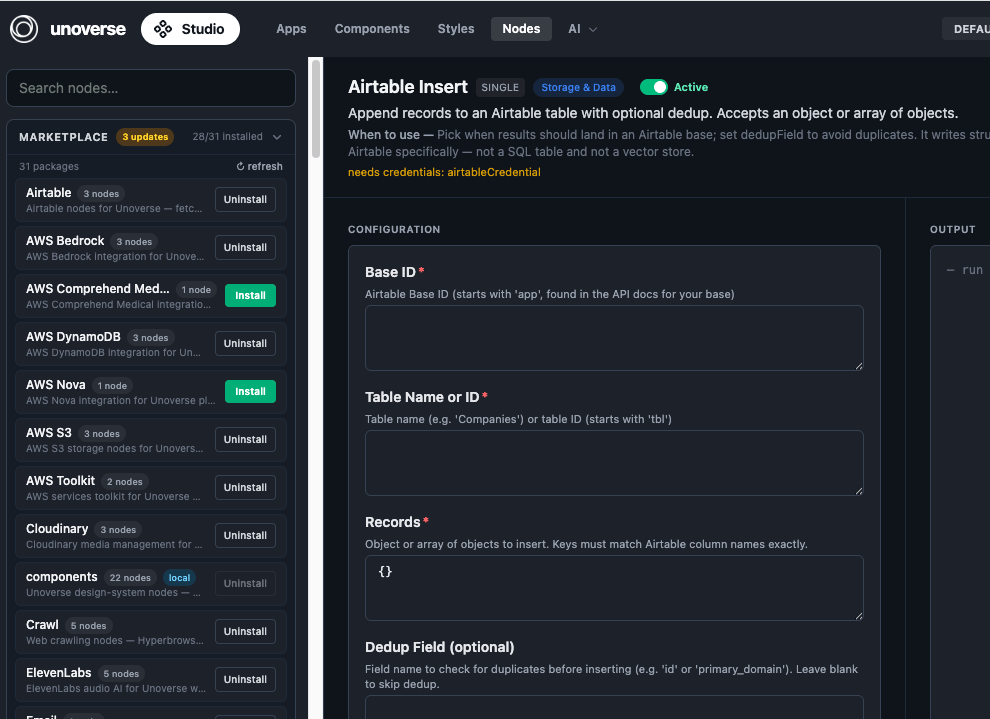
2
Install what you need
Click Install on a package. Its nodes register with the platform and appear in the node library in Canvas, ready to drag into a workflow. Uninstall removes them the same way.Install OpenAI now; the next challenge uses it to build your first Agent.
3
Add credentials where required
Some nodes talk to external services and name the credential they need. Add it in Canvas under Credentials. The next challenge walks through this for your OpenAI key.
4
Stay current
The marketplace badges packages with available updates. Click Refresh to check, then update a package in place.
Installed packages are part of your platform state, so they deploy themselves. Production reads the same state and installs the same packages automatically; there is nothing extra to ship.
Next steps
Create your first Agent
Wire a trigger, a model, and a response together in Canvas, and talk to it.
Create your first node
Need something the marketplace doesn’t have? Build it.